
How to Identify Customization Needs for Donor Platforms
Identify workflow gaps, gather donor and staff feedback, and prioritize six targeted customizations to streamline sponsorship management.


Running effective donor sponsorship programs without a tailored platform leads to inefficiencies, errors, and wasted resources. If you're relying on spreadsheets or manual processes, you're likely facing issues like mismatched pairings, lost donors due to failed payments, and time-consuming administrative tasks. A customized donor platform can automate up to 90% of routine tasks, reduce response times by 60%, and ensure smoother operations.
Key Takeaways:
- Streamline Workflows: Automate tasks like updating donors and generating tax receipts.
- Save Time: Replace manual processes with tools for real-time tracking and self-service options.
- Enhance Donor Trust: Use branding features and user-friendly interfaces to improve confidence.
- Gather Feedback: Surveys and interviews help pinpoint pain points for staff and donors.
- Define Needs: List essential features like recurring payments, centralized dashboards, and automated reminders.
- Plan Data and Reporting: Focus on key metrics like donor engagement, payment tracking, and sponsorship impact.
By focusing on practical customizations, you can improve efficiency, reduce errors, and strengthen donor relationships, allowing your team to focus on advancing your mission.
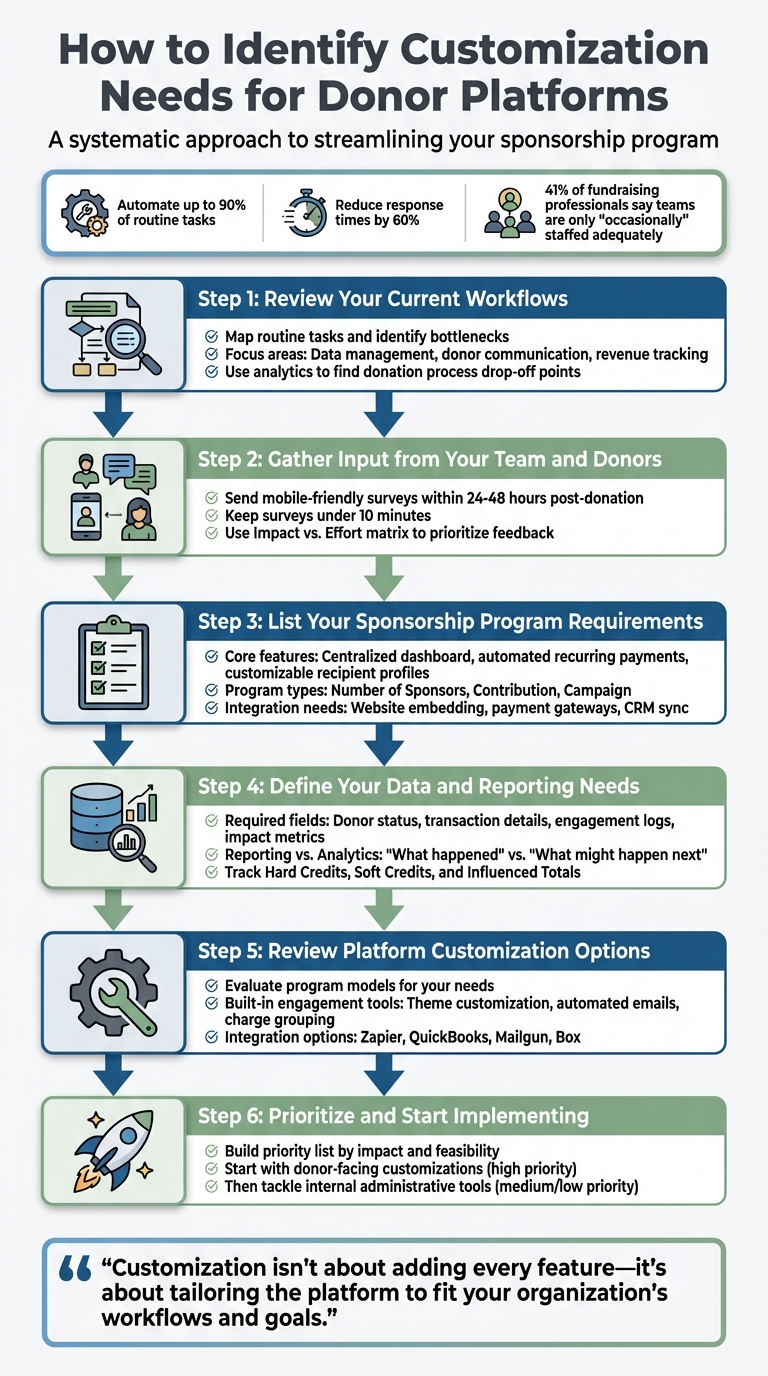
6-Step Process to Identify Donor Platform Customization Needs
How To Choose The Best Donor Management System For Your Nonprofit
Step 1: Review Your Current Workflows
Take a close look at your daily operations - they often reveal where your donor platform isn’t cutting it. Start by mapping out your team’s routine tasks, like logging new sponsorships or sending out year-end tax receipts. If manual data entry is eating up hours every week, it's a clear sign that your current system might not be pulling its weight.
Spot Workflow Issues
The biggest inefficiencies usually show up in three key areas: data management, donor communication, and revenue tracking. For instance, when donor details are scattered across multiple spreadsheets, you risk mismatched sponsor-child pairings, duplicate records, and a mountain of manual work to create IRS receipts and thank-you notes. On top of that, missed failed payments can mean losing recurring revenue.
Another red flag? Donors abandoning the donation process. Use tools like Google Analytics to pinpoint where people drop off in your conversion funnel. You can also simulate the experience of a first-time donor to identify problems like slow page loading, too many form fields, or being redirected to external payment sites. These friction points could be costing you donations every single day.
Once you’ve identified these issues, it’s time to evaluate whether your platform has the right tools to address them.
Evaluate Platform Features You’re Using
After identifying gaps in your workflows, check how well your platform supports your needs. Underused features might point to a lack of customization. For example, does your system let you monitor successful and failed payments in real time? Does it offer role-based access controls to safeguard sensitive donor data? And can it automatically flag duplicate records?
Think about tasks like year-end receipting. If your team spends hours manually compiling tax summaries for hundreds of donors, a self-service portal could save a lot of time by letting donors download their own documents. Compare the features your platform offers with the ones you actually use - this will help you determine where customization might make a big difference. Considering that 41% of fundraising professionals say their teams are only "occasionally" staffed adequately, cutting out manual bottlenecks is more important than ever.
Pinpointing these workflow challenges lays the groundwork for improving donor management through tailored solutions.
Step 2: Gather Input from Your Team and Donors
Your team and donors are the ones who experience the platform's challenges up close. Their feedback is invaluable for identifying real-world pain points. For example, program managers might find reporting tools frustratingly complex, while field staff could struggle with mobile-unfriendly forms. On the donor side, people may abandon their donation if creating an account feels like a hassle.
Run Surveys and Interviews
Design surveys that focus on key donor interactions. A great approach is to send out a concise, mobile-friendly survey within 24–48 hours after a donation. Use a mix of scaled questions, multiple-choice options, and open-ended prompts to gather immediate and actionable feedback. Aim to keep these surveys under 10 minutes to minimize drop-off rates.
For your internal team, conduct interviews with program managers and field staff. Ask them specific questions about their most time-consuming responsibilities and the data tracking features they feel are missing.
Rank Stakeholder Feedback by Importance
Once you’ve collected feedback, the next step is to prioritize it. Use an Impact vs. Effort matrix to identify changes that offer the biggest benefits relative to the effort and cost involved. For example, donors often value features like ease of use and mobile accessibility, while program managers are more concerned with maintaining data accuracy and having flexible reporting tools.
In your survey, include a ranking exercise where stakeholders can select their top three priorities from a list of potential improvements - such as mobile-friendly forms, automated tax receipts, or custom branding. This kind of data can provide solid justification for customization decisions when presenting them to leadership. Before implementing any major updates, run a quick user acceptance test with a small group of stakeholders. This ensures the new feature actually solves the identified problem.
“When organizations use nonprofit surveys to understand what donors value, why they give, or what might be bugging them, they can improve donor retention, boost average gift size, and grow lifetime value”.
Step 3: List Your Sponsorship Program Requirements
This step is all about addressing the specific gaps in your sponsorship program. After gathering feedback from your team and donors, focus on identifying the must-have features that will ensure your program runs smoothly. By doing so, you can align your goals with the platform capabilities by aligning sponsorship programs with your mission needed to achieve them. Keep in mind that generic fundraising platforms often fall short when it comes to the specialized needs of sponsorship management. By clearly defining these requirements, you set the stage for a platform that’s tailored to your program’s success.
Identify Core Features for Sponsorship Programs
Start by listing the features that are critical to your sponsorship model. For instance, a centralized dashboard is key to managing everything in one place - donor profiles, sponsorship statuses, payment histories, and recipient details. This eliminates the hassle of juggling multiple systems and prevents data silos.
Another must-have is automated recurring payments. Your platform should handle these transactions effortlessly, flagging failed payments and sending reminders when credit cards are about to expire. This ensures a steady flow of recurring revenue without constant manual intervention.
Customizable recipient profiles are also essential. These should allow you to add specific details, such as age or medical history, using custom fields. Features like "Use as Bio" are especially helpful, enabling you to display selected information publicly while keeping sensitive data private.
Your platform should also support different types of sponsorship programs to meet your unique needs:
- Number of Sponsors programs: Ideal for one-on-one matches, like pairing a donor with a child.
- Contribution programs: Perfect for high-cost needs, such as medical treatments or tuition, where multiple donors can contribute toward a single goal.
- Campaign programs: Designed for broader initiatives like disaster relief or construction projects.
By choosing the right program type, you can avoid unnecessary workflow headaches.
Finally, include tools for digital engagement to keep donors connected. Features like letter exchanges, note uploads, and AI-generated progress updates help maintain strong relationships. Self-service options for donors can also reduce the administrative workload for your team.
Determine Your Website and System Integration Needs
Internal features are important, but don’t overlook the value of seamless external integrations. Your sponsorship platform should work effortlessly with your website and other systems. For example, embedding sponsorship cards and forms directly on your site ensures donors stay within your branded environment instead of being redirected elsewhere. Use theme configuration settings to match the platform’s design to your organization’s colors and style.
Payment methods should align with gateways like Stripe, PayPal, ACH, and wire transfers. If you rely on tools like Salesforce or Zapier, plan how data will flow between systems. Features like the "Manage Fields" tool can automatically sync custom fields with your CRM, saving time and effort.
Lastly, enable charge grouping (e.g., combining same-day charges) to cut down on fees and simplify receipts for your donors. These small adjustments can make a big difference in streamlining your operations.
Step 4: Define Your Data and Reporting Needs
Once you've outlined your requirements, it’s time to figure out what data you need to collect and how you’ll report on it. This goes beyond just storing information - it’s about cutting down on admin work and keeping things transparent for your donors and board members. Accurate data doesn’t just streamline operations; it also helps you show the impact of your sponsorships, answer important questions quickly, and make smart decisions about the future of your program.
List Required Data Fields
Start by pinpointing the key data fields that will drive your donor management and sponsorship tracking efforts. Your system should capture vital donor information, such as their status (active or archived), join date, total donations, and contact details. Including relationship and household tracking ensures you avoid duplicate mailings and fragmented records.
For donation and transaction details, make sure to log the date of each donation, the recipient or program it supports, the amount, payment method (credit card, PayPal, ACH, wire transfer), and the transaction outcome (success or failure). This level of detail allows you to spot payment issues early. On the sponsorship side, track recipient names, payment schedules, upcoming due dates, and the current sponsorship status. It’s also important to differentiate between Hard Credits (direct contributions), Soft Credits (tribute gifts), and Influenced Totals (donations influenced by fundraisers or donor-advised funds) to accurately measure fundraising success.
To ensure transparency and accountability, maintain engagement and activity logs that capture donor-recipient communication, email open rates, account logins, and administrative updates. For sponsorship programs, include impact metrics such as educational achievements, health improvements, and medical histories to show stakeholders how their contributions are making a difference. Use tools like "Manage Fields" to customize your data collection, adding unique details like recipient health records or specific donor preferences for more tailored communication.
Plan Your Custom Reports
Once you’ve nailed down the data fields, focus on creating reports that turn raw numbers into actionable insights.
It’s important to understand the distinction between reporting and analytics. As HelpYouSponsor explains, "While reporting tells you what happened, analytics [shows] what might happen next". Your reporting strategy should address both. For operational tracking, use activity logs to monitor details like payment failures, profile changes, and recent donations. Categorize actions (e.g., "Commitments") to identify trends that may require dedicated reporting.
For long-term planning, take advantage of analytics dashboards that highlight trends over time. For example, HelpYouSponsor offers graphs showing three-year transaction and commitment trends, which can help you spot growth patterns and anticipate future needs. Create dashboards tailored to stakeholders - internal teams benefit from metrics on operational efficiency, while donors appreciate reports showcasing the impact of their support, such as educational progress, health improvements, and community development.
To boost donor retention, track communication history, engagement levels, and donation frequency, then use this data to create personalized retention reports. These reports can help you reconnect with supporters before they disengage. Regularly review your donor and recipient profiles to ensure you’re collecting the right data for these reports. Additionally, use built-in tools to generate year-end tax summaries in CSV or PDF format, cutting down on administrative work when tax season rolls around.
Step 5: Review HelpYouSponsor's Customization Options
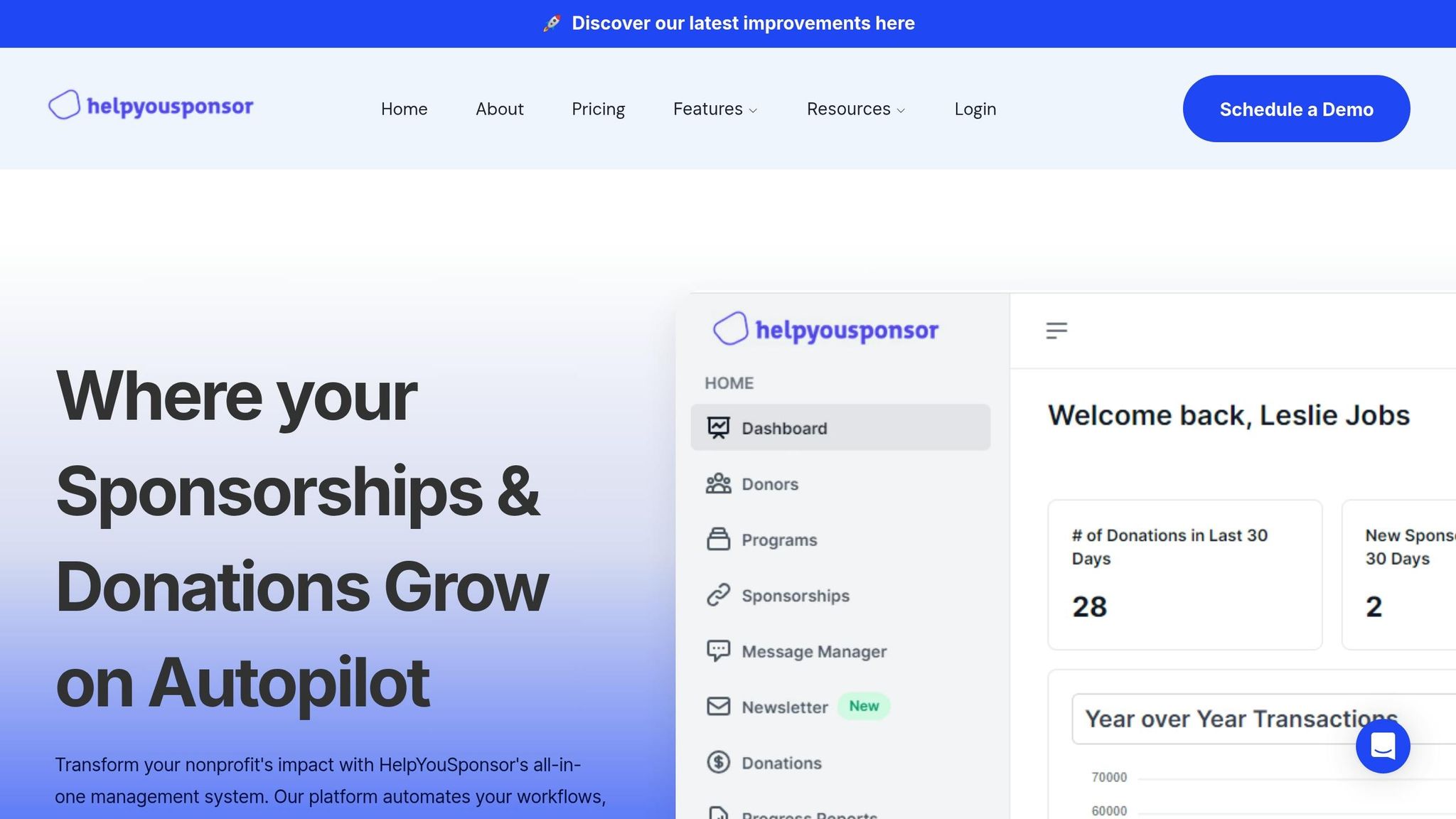
Once you’ve identified your data and reporting needs, it’s time to dive into HelpYouSponsor’s customization features. Designed by professionals with hands-on experience in sponsorship programs, this platform is built to support nonprofits handling a variety of sponsorship initiatives - whether it’s child sponsorships, building campaigns, or covering medical expenses. Let’s take a closer look at how its tailored features can help meet your organization’s goals.
Manage Different Types of Sponsorships
HelpYouSponsor offers three main program models, each adaptable to your specific objectives:
- Contribution Model: Requires donors to make monthly contributions until a financial target is met, such as $200 per month for a child.
- Number of Sponsors Model: Completes sponsorships when a set number of donors commit to a monthly amount (e.g., two sponsors per recipient).
- Campaign Structure: Ideal for cause-based projects without individual recipients, featuring donation goals and fixed timelines.
Each model includes flexible customization options. For example, in Contribution programs, you can enable the "Hide Fulfilled Contribution Levels" feature to automatically remove sponsorship opportunities once a recipient’s funding goal is reached. This prevents over-funding and ensures resources are distributed effectively. Additionally, you can personalize donor-facing text on the homepage, recipient profiles, and donor dashboards to align with your organization’s tone and messaging.
Use Built-In Tools for Donor Engagement
HelpYouSponsor goes beyond basic program structures by offering tools that enhance donor engagement. Visual branding and automated communication features make it easy to maintain a professional and cohesive look. The platform’s no-code theme configuration system allows you to customize the donor portal and forms with your preferred color palette. You can even adjust contrast levels (from 50 to 950) to ensure accessibility. By default, new accounts use an Indigo color at level 600, but this can be updated to better reflect your brand identity.
For payment processing, the "Combine Same-Day Charges" option consolidates multiple commitments into a single transaction. This way, donors supporting multiple sponsorships receive just one receipt and email, simplifying their experience. Automated emails with system shortcodes further personalize communication, keeping donors informed and engaged without requiring additional effort from your team.
Access Custom Reporting and Integration Features
HelpYouSponsor integrates seamlessly with external tools, making it easier to manage your workflows and data. Whether it’s automating tasks, syncing financial records, or streamlining communication, the platform connects with a variety of services:
| Integration Type | Service | Purpose |
|---|---|---|
| Automation | Zapier | Connects to thousands of apps to simplify workflows |
| Accounting | QuickBooks | Automates financial data syncing and reduces manual entry |
| Communication | Mailgun | Ensures reliable, enterprise-level email delivery for donor updates |
| Storage | Box | Offers secure cloud storage for important documents |
For website integration, the "Embed" button within the "Recipients" or "Campaigns" sections lets you generate links and preview how sponsorship pages will appear on your site. Additionally, the platform’s activity logging tracks all donor and admin actions, including payments (successful or failed), with filters like "Commitments." Graphical transaction summaries and sponsorship data from the past three years are available on the dashboard or through custom filters, giving you a clear view of your organization’s performance.
Step 6: Prioritize and Start Implementing Customizations
Build Your Customization Priority List
Now that you've identified your needs, it's time to organize them into actionable steps. Start by creating a priority list based on impact and feasibility. This ensures you tackle the changes that matter most while keeping things manageable.
Separate your customizations into two categories: donor-facing changes and internal administrative tools. For example, updating theme colors can enhance every visitor's experience without requiring advanced coding skills. A global theme update applies to all programs, making it a quick win with broad benefits.
Next, focus on your data management requirements. Check the available fields in the Donors Table to ensure they meet your workflow needs. If critical data points are missing, flag those as high-priority items. Before requesting advanced custom reports, test the platform's standard tools like Advanced Search and Export to see if they meet your needs.
Use a Comparison Table to Make Decisions
A comparison table can help you clearly see where the platform’s default features meet your needs and where customizations are required. Start by using HelpYouSponsor's standard settings as your baseline. For instance, the platform uses an "Indigo" color theme (level 600) by default. Evaluate standard tools like "Add Donor", "Send Emails", and "Export" in the Donors Table to determine if they fulfill your requirements or if additional functionality is needed.
| Feature Category | Standard Capability (HYS) | Custom Need / Requirement | Priority Level |
|---|---|---|---|
| Branding | Default color levels (50-950) and preset colors (e.g., Indigo) | Specific brand hex codes via Custom Color Palette | High |
| Data Fields | Standard donor profile form fields | Unique sponsorship requirements or custom donor attributes | High |
| Reporting | Standard Donors Table with "Export" to CSV | Specific "Saved Views" for recurring specialized reports | Medium |
| Search | Basic search and "Advanced Search" with comparison logic | Complex multi-system data integrations | Low |
Start with donor-facing customizations to ensure your public-facing elements reflect your organization’s identity. Once those are in place, you can shift focus to internal administrative improvements. This step-by-step approach ensures a smoother implementation process.
Conclusion
Customizing your donor platform isn’t about adding every feature under the sun - it’s about tailoring the platform to fit your organization’s workflows and goals. By following our guide to setting up your sponsorship software, you can evaluate processes, gather feedback, define clear requirements, plan for data needs, and focus on the changes that will make the biggest impact.
Start with donor-facing customizations to create a seamless and professional experience. For example, aligning your platform’s theme colors with your branding can build trust and reinforce your organization’s identity. Tools like HelpYouSponsor's Theme Color Configuration make this process straightforward - no coding needed. Whether you’re managing Contribution Programs for medical sponsorships, Number of Sponsors Programs for one-on-one child sponsorships, or Campaign Programs for disaster relief, your platform can be adjusted to suit your unique needs.
Once your public-facing tools are set, shift attention to internal workflows. Evaluate built-in features like donation tracking and report generation to see if they meet your needs before investing in custom solutions. Often, these built-in tools can save time and reduce costs by simplifying routine tasks.
FAQs
What should I customize first: donor experience or staff workflows?
To make fundraising efforts truly effective, focus on creating a personalized donor experience. When donors feel valued and understood, it strengthens their connection, builds trust, and encourages long-term support. After refining this experience, shift your attention to optimizing staff workflows. Ensure that internal processes are streamlined to support these tailored interactions efficiently. By aligning donor engagement with behind-the-scenes operations, you can enhance both the external impact and internal efficiency of your platform.
Which data fields are essential for sponsorship tracking and reporting?
To effectively manage sponsorships, it's essential to track specific data points. These include:
- Donor Information: Names, contact details, and demographic data provide a clear picture of your sponsors.
- Sponsorship Details: Information such as the sponsorship amount, type, and current status helps keep everything organized.
- Payment Methods and Transaction History: Knowing how payments are made and maintaining a record of all transactions ensures transparency.
- Sponsorship Dates and Renewal Status: Keeping track of start and end dates, as well as renewal details, is vital for maintaining long-term relationships.
- Activity Logs and Communication Records: Documenting interactions and updates helps ensure consistent and informed engagement with sponsors.
Additionally, analyzing retention rates and donation trends can provide valuable insights into performance and return on investment (ROI). By keeping these data fields in check, organizations can streamline sponsorship management and improve reporting accuracy.
How do I decide if a requested customization is worth the effort?
When considering customization, it's essential to weigh its influence on branding, donor experience, and administrative efficiency. Ask yourself: Does it align with your brand identity, like matching theme colors or fonts? Consistent branding reinforces recognition and trust, making it a valuable investment.
Think about how it affects donor engagement. For example, does it create a smoother, more personalized experience? Features like tailored donation pages or automated thank-you emails can leave a lasting impression and encourage repeat contributions.
On the operational side, customization can save time by automating repetitive tasks or simplifying workflows. If it improves usability, boosts donor retention, or delivers tangible benefits - like saving staff hours or increasing donations - it’s likely worth the effort.
However, steer clear of changes that demand significant resources but yield little impact. Always balance the effort required against the potential benefits to ensure your time and energy are well spent.