
Designing Frictionless Digital Payment Experiences for Donors
Create secure, mobile-first donation checkouts with multiple payment options, simplified forms, and automated donor management to reduce abandonment and boost conversions.

When donors decide to give, the process must be quick, clear, and secure to keep their trust. Research shows 47% of donation abandonments happen due to usability issues, like confusing layouts or slow workflows. Nonprofits, especially those relying on recurring contributions, risk losing support if their payment systems don’t meet modern expectations.
Key insights:
- Simplifying donation forms can boost conversions by up to 400%.
- By 2026, 54% of transactions will use digital wallets, and younger donors already prefer online giving.
- Mobile optimization is critical, as 57% of nonprofit website traffic comes from mobile devices, but mobile cart abandonment remains high at 79%.
- Offering multiple payment options, like credit cards, digital wallets, and ACH transfers, increases donor convenience and retention.
Platforms like HelpYouSponsor streamline this process with secure payment gateways, mobile-friendly forms, and automated donor management tools. Testing and refining your donation system ensures smooth transactions, builds trust, and encourages long-term support.
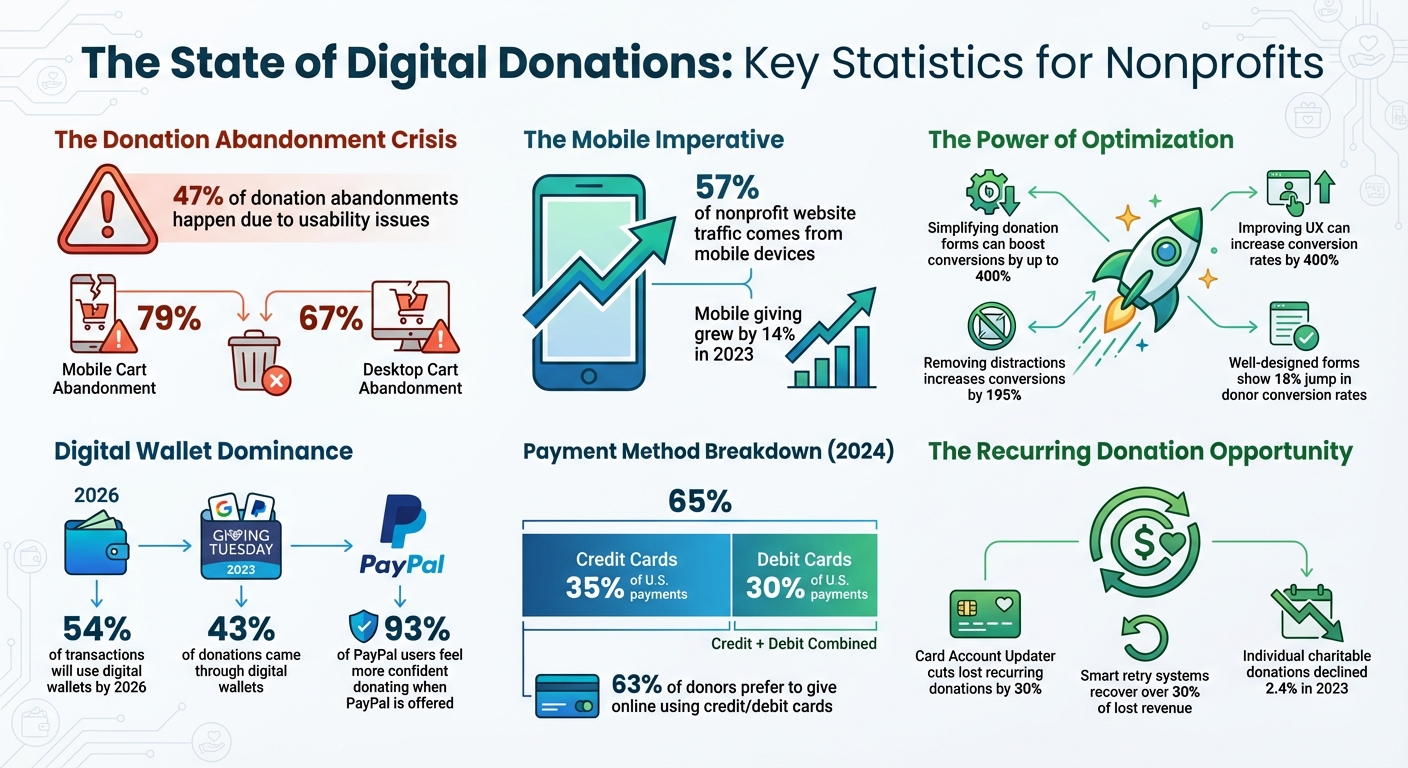
Digital Donation Statistics: Mobile Usage, Conversion Rates, and Payment Trends for Nonprofits
Setting Up Secure Payment Gateways with HelpYouSponsor
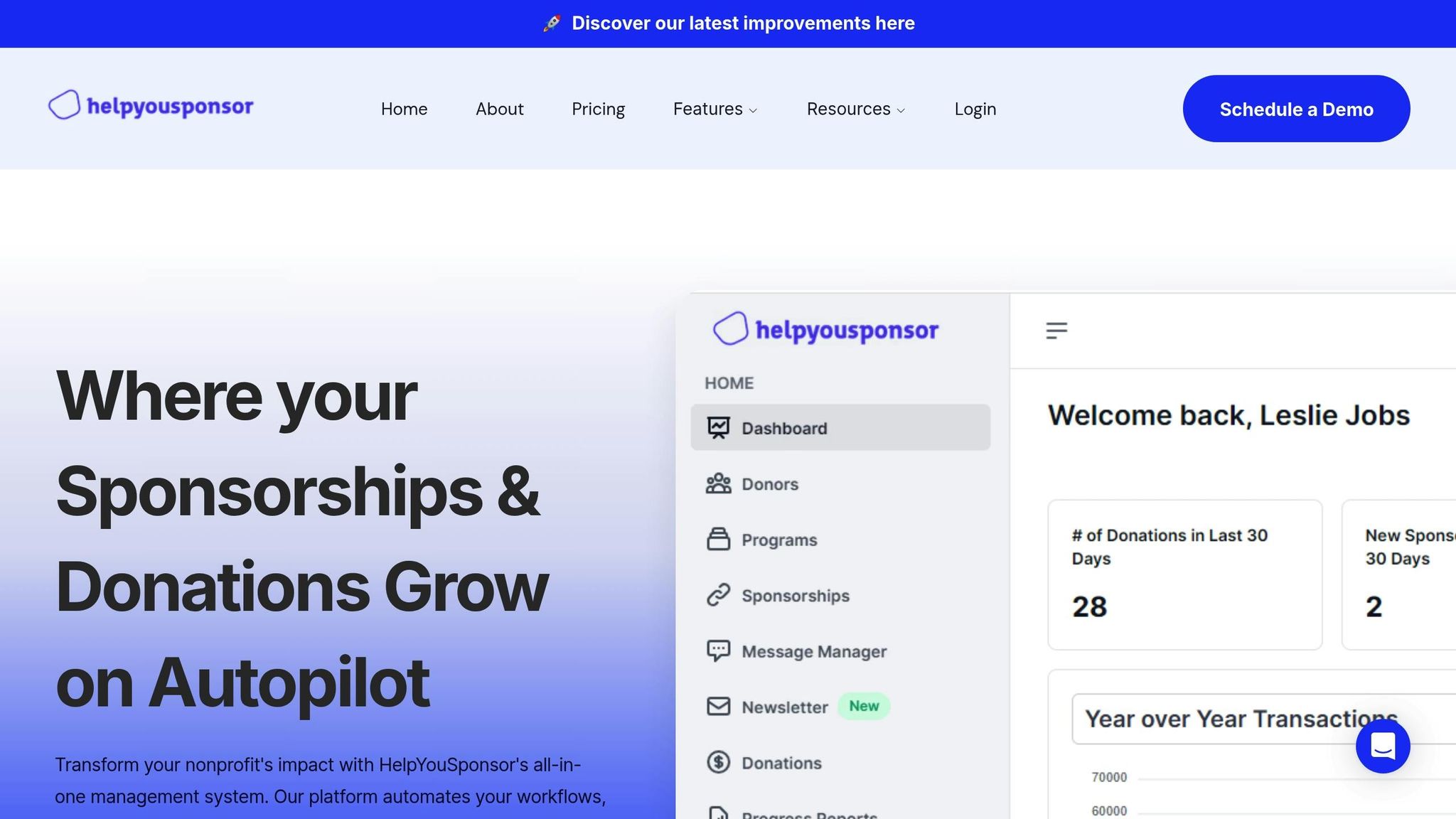
Why Secure Payment Gateways Matter in HelpYouSponsor
When donors share their credit card details, they’re entrusting you with sensitive financial information. A secure payment gateway safeguards this trust by encrypting the data during transmission and using tokenization to replace card numbers. This ensures that sensitive information never resides on your organization’s servers, minimizing your security risks.
HelpYouSponsor partners with PCI Level 1 certified providers, the highest standard in payment security. This certification guarantees that each transaction complies with the stringent rules set by major credit card companies. For nonprofits, this isn’t just about meeting regulations - it’s about maintaining your reputation. As Kindful aptly puts it:
A secure payment processor will help maintain your nonprofit's positive reputation and increase donors' trust in your donation process.
HelpYouSponsor supports five major payment gateways: Stripe, PayPal, Flutterwave, QPayPro, and Authorize.net. You have the flexibility to configure one credit card gateway alongside PayPal, offering donors both choice and security. Stripe, for example, boasts a 99.999% uptime even during high-traffic events like GivingTuesday and provides nonprofits with discounted processing fees at 2.2% + $0.30 per transaction.
How to Configure Payment Gateways in HelpYouSponsor
To set up your payment gateway, start by heading to "Settings" in the HelpYouSponsor dashboard, then click on "Payment Gateways". From there, you can select and configure your preferred provider. If you plan to use PayPal, double-check that your organization’s Base Currency is supported by the platform.
Once your gateway is selected, make sure to enable fraud protection features like Address Verification Service (AVS) and CVV checks to help detect and block suspicious transactions. If you’re using Stripe, activate Stripe Radar - an AI-driven tool that monitors transactions in real time and reduces fraud by up to 25%. Before going live, test your setup thoroughly using the gateway’s sandbox environment. Additionally, ensure your donation pages are secured with HTTPS and display security badges prominently to reassure donors that their data is safe.
Providing Multiple Payment Options for Donors
Payment Methods Available in HelpYouSponsor
Donors have different preferences when it comes to how they give. Some prefer the convenience of credit cards, while others lean toward digital wallets or direct bank transfers. Offering a variety of payment methods isn’t just a nice-to-have - it can make or break whether someone follows through with their donation.
HelpYouSponsor supports all major credit and debit card networks, including Visa, Mastercard, American Express, and Discover. In 2024, credit cards accounted for 35% of payments in the U.S., while debit cards made up 30%.
Digital wallets like Apple Pay, Google Pay, and PayPal make donating easier by skipping the need for manual card entry. On Giving Tuesday 2023, 43% of donations came through digital wallets, and by 2026, this figure is projected to reach 54% of all online transactions. Trust also plays a role - 93% of PayPal users said they feel more confident donating to nonprofits that offer PayPal as an option.
For larger or recurring donations, ACH bank transfers are a cost-effective choice with lower processing fees compared to credit cards. Meanwhile, younger donors increasingly expect peer-to-peer payment options such as Venmo and Cash App, which are especially popular for grassroots and social-media-driven campaigns.
The trend toward digital transactions is clear. By providing multiple payment options, you not only meet donor expectations but also increase the likelihood of turning one-time gifts into long-term support.
Benefits of Recurring Donation Options
Offering flexible payment methods doesn’t just make it easier for donors - it opens the door to recurring contributions. Recurring donations help nonprofits by creating steady, predictable revenue while allowing donors to make a lasting impact over time.
In 2023, individual charitable donations in the U.S. saw a 2.4% decline, underscoring the importance of building a stable income stream through recurring gifts.
Charles Zhang, founder of Donorbox, emphasizes this point:
For nonprofits to be successful, it's imperative they present donors with a smooth and slick checkout flow.
One way to reduce interruptions in recurring donations is by using tools like Stripe's Card Account Updater, which automatically updates expired or replaced card information. This has been shown to cut lost recurring donations by 30%.
HelpYouSponsor makes setting up recurring donations simple. The platform processes contributions on a schedule you choose - monthly or annually - without requiring donors to take additional steps. If a payment fails, smart retry systems and automated reminders can recover over 30% of lost revenue.
Additionally, a self-service portal allows donors to manage their contributions. They can update payment details, change donation amounts, or even pause their support without contacting your team. Many nonprofits now default their donation forms to monthly giving, subtly encouraging sustained contributions while still allowing flexibility.
Best Donation Page Optimizations For Nonprofits | Webinar Video
Creating Mobile-Friendly Donation Experiences
Did you know that mobile devices account for 57% of nonprofit website traffic? On top of that, mobile giving grew by 14% in 2023 - yet, there’s a catch. Cart abandonment rates on mobile devices hit an alarming 79%, far exceeding the 67% rate on desktop. These numbers make one thing clear: nonprofits must prioritize optimizing mobile donation experiences.
Mobile users often juggle multiple tasks in various environments, making them less patient with clunky forms or distractions. Stripe puts it perfectly:
Mobile users might be browsing from a sofa, walking between meetings, queuing or multi-tasking... This makes mobile checkout more vulnerable to basket abandonment.
The stakes are high. Poor usability leads to 47% of donation abandonments. On the flip side, improving the user experience on donation pages can boost conversion rates by a staggering 400%. The message is simple: get mobile right, and you’ll see more donations completed.
Mobile-Responsive Donation Forms in HelpYouSponsor
HelpYouSponsor tackles this challenge head-on with a mobile-first design approach. Instead of shrinking desktop forms to fit smaller screens, their donation forms are built specifically for smartphones and tablets.
Here’s how they make it work:
- Forms feature a single-column, vertical layout, eliminating the need for horizontal scrolling and keeping everything within a donor’s thumb’s reach.
- Donors can complete their gift without leaving your website, thanks to forms that embed directly or display as pop-up overlays.
- Buttons are strategically placed in the "thumb zone" and sized for easy, mistake-free tapping.
- Payment entry is simplified with the right mobile keyboard automatically popping up - like a numeric keypad for card numbers.
To further streamline the process, features like autocompletion and autofill reduce the amount of typing required. Real-time validation flags errors immediately, while labels outside input fields ensure donors don’t lose context when the keyboard appears.
Security is another top priority. Trust signals, including HTTPS padlocks, SSL/TLS badges, and familiar payment logos like Visa, Mastercard, and Apple Pay, reassure donors their information is safe. And by removing distractions - like global navigation and search bars - from donation pages, conversion rates have been shown to increase by 195%.
Enabling One-Click Payments for Faster Donations
Digital wallets like Apple Pay and Google Pay take convenience to the next level. Instead of manually entering card numbers and billing details, donors can complete transactions instantly using biometric data or saved device information. As Stripe explains:
Digital wallet payments speed up the process by letting users skip the payment form, and they're often perceived as more secure.
HelpYouSponsor integrates with payment gateways like Stripe to enable one-click payments. To maximize conversions, digital wallet buttons are placed prominently at the top of the form.
Another key feature? Guest checkout. Forcing donors to create an account before donating often leads to frustration and abandonment. By offering a guest checkout option, nonprofits can reduce friction and ask for account creation only after the transaction is complete.
For recurring donations, HelpYouSponsor provides a mobile-friendly donor portal. Supporters can easily manage their contributions - updating payment methods, adjusting donation amounts, or even pausing donations - without needing to contact support. This self-service option keeps donors in control and engaged.
Automating Donor Data and Receipt Management
Once a donor completes their gift, the behind-the-scenes work kicks into gear. Tasks like manually entering data and drafting emails can eat up valuable time and increase the risk of errors. HelpYouSponsor takes the hassle out of this process by automating everything - from payment processing to sending acknowledgments. It creates a seamless connection between donation handling and donor management.
Connecting Payments to Donor Profiles
With HelpYouSponsor, every donation is instantly synced to your donor database. The system automatically updates donor profiles, organizes transactions, and manages recurring gift processes. When someone makes a contribution, their name, email, and payment details are captured. The platform then either links the new donation to an existing profile or sets up a new one.
This real-time syncing ensures you always have an accurate and up-to-date view of your donors' giving history. The platform also categorizes and logs each transaction automatically, simplifying tasks like bank reconciliation and donation reporting. For recurring donations, HelpYouSponsor handles dunning management by retrying failed payments and notifying donors before their payment methods expire.
By keeping donor profiles current and organized, the system enables you to send timely acknowledgments, strengthening the relationship between your organization and its supporters.
Sending Automated Receipts and Thank-You Messages
Sending prompt thank-you messages is crucial for encouraging future donations. But manually crafting receipts for every gift? That’s just not feasible at scale. HelpYouSponsor makes this effortless by automatically generating and sending personalized thank-you emails and tax receipts as soon as a donation is processed [22, 30].
Setting this up is simple. Go to Settings in the main menu, then click on Email Settings. From there, you can customize your confirmation emails using merge fields like the donor’s name and donation amount, ensuring each message feels personal. For U.S.-based donors, receipts automatically include the date, dollar amount, and your organization’s 501(c)(3) status, fulfilling IRS requirements for tax-deductible contributions.
But it doesn’t stop at receipts. The platform’s Communication Tools let you schedule automated messages for special occasions - like the anniversary of a donor’s first gift - or send periodic updates about the impact of their contributions [32, 34]. Considering that 63% of donors prefer to give online using credit or debit cards, and 25% of online donations now come from mobile devices, it’s essential to ensure these automated emails are mobile-friendly to maximize engagement.
Testing and Launching Your Payment System
Before rolling out your donation page, it’s crucial to test every part of your payment process. A single checkout error can lead to lost donations and damage trust. HelpYouSponsor provides tools to thoroughly test your payment setup, ensuring smooth and secure transactions right from the start.
How to Test Payment Gateway Integrations
Begin testing in a sandbox environment. This setup replicates your live donation page but doesn’t process real transactions. Use test card numbers to simulate various scenarios like successful payments, declines, insufficient funds, and fraud alerts.
Pay close attention to webhooks - these are the automated signals that handle tasks like sending receipts or updating donor profiles. Make sure they work correctly, even if a donor closes their browser before reaching the confirmation page. Test your system across multiple devices and browsers to confirm that forms display and function properly on smartphones, tablets, and desktops.
Don’t just focus on successful transactions - error handling is just as important. Simulate failures using expired cards, incorrect CVV codes, or network disruptions. Your system should provide clear, user-friendly error messages instead of confusing technical jargon. Considering the global payment gateway market is projected to hit $189 billion by 2032, donors now expect the same seamless experience they get from major e-commerce platforms.
Once you’ve ironed out transaction issues, shift your attention to protecting donor data.
Meeting U.S. Data Protection Requirements
Earning donor trust is one thing, but keeping it requires strict data protection. The Payment Card Industry Data Security Standard (PCI DSS) outlines 12 key requirements to safeguard cardholder data. These include maintaining firewalls, encrypting sensitive information, and controlling access to payment data. As Stripe emphasizes:
If donor data is compromised through a breach, phishing attack, or technical oversight, you're risking fines, account suspension, reputational damage, and revenue loss.
HelpYouSponsor simplifies this process by partnering with PCI Level 1 certified payment processors, which handle the toughest security protocols for you. To further enhance security, implement two-factor authentication and require password updates every 90 days. Avoid storing sensitive details like CVV codes or full card numbers on local systems. Instead, use tokenization, which replaces card numbers with unique tokens. This way, even if your system is breached, no usable data is exposed.
To stay compliant, complete your annual Self-Assessment Questionnaire (SAQ). For example, the College of Charleston mandates that employee merchants use approved payment portals, submit Access Control Lists twice a year (August 15 and February 15), and complete departmental assessments to uphold PCI DSS standards. With credit and debit cards expected to account for 65% of U.S. payments in 2024, safeguarding this data is critical for maintaining strong donor relationships.
Conclusion
In today's world, creating secure, mobile-friendly, and user-friendly donation systems is key to keeping donors engaged. A smooth donation process does more than just accept payments - it builds trust, eliminates obstacles, and makes it easier for donors to contribute.
Consider this: nonprofits using well-designed, integrated donation forms have seen an 18% jump in donor conversion rates. Even fixing small usability issues can increase total donations by 10%. With projections showing that 54% of online transactions will use digital wallets by 2026 and 57% of nonprofit website traffic already coming from mobile devices, there's no better time to refine your systems.
HelpYouSponsor offers a complete solution that secures payments and streamlines donor management. By simplifying the donation process, you not only increase conversions but also strengthen relationships with your supporters.
Take the time to test your payment processes, fine-tune mobile forms, and automate routine tasks. Every adjustment you make leads to more funding for your mission and a better experience for your donors. Your cause deserves a payment system that works as tirelessly as you do - turning every visit to your donation page into a chance to create meaningful change.
FAQs
How does simplifying donation forms help increase donor participation?
Simplifying donation forms is a game-changer when it comes to encouraging donor participation. By cutting out unnecessary steps and streamlining the process, you make it easier for people to give. Forms that are clear and to the point, with only the essential fields, help donors complete their contributions quickly and without hassle. Adding features like auto-fill, address lookup, or pre-filled information can save time and make the experience far more convenient.
It's also crucial to ensure that your forms work seamlessly on mobile devices. With so many people using their phones for everything, a mobile-friendly design lets donors contribute effortlessly, no matter where they are. Personal touches, like tailored donation requests, and an intuitive design build trust and make the process feel more inviting. These small tweaks can have a big impact, boosting both donor satisfaction and the number of completed donations.
Why is it important to optimize nonprofit donation systems for mobile devices?
Optimizing donation systems for mobile devices is a must for nonprofits, especially since nearly half of all online donations now come from mobile users. A smooth, mobile-friendly experience allows donors to contribute quickly and easily, without the frustration of slow-loading pages or clunky layouts. This not only removes common hurdles but also helps ensure more donations are completed.
Meeting donor expectations for convenience is key, particularly as younger, tech-savvy individuals increasingly prefer digital interactions. Features like simplified forms, faster load times, and intuitive navigation can significantly improve conversion rates and even encourage repeat donations. Focusing on mobile optimization isn’t just about keeping up with trends - it’s about creating a better experience for donors and driving greater fundraising success.
Why is it important to offer multiple payment options for donors?
Offering a variety of payment options is a smart way to make donating easier and more accessible. Whether someone prefers using a credit card, debit card, digital wallet, ACH transfer, or mobile payment, having these choices ensures donors can give in a way that suits them best.
This approach helps remove potential obstacles that might stop someone from completing their donation. It also enhances the overall donor experience, increasing the chances of one-time donors becoming repeat supporters. Plus, in today’s fast-paced world, where people expect quick and simple transactions, offering multiple payment methods can play a big role in building trust and boosting fundraising efforts.