
Creating Custom Trip Pages with HYS: Engage Donors and Participants
Step-by-step guide to building branded, mobile-friendly trip pages with payment setup, progress trackers, recurring gifts, and automated donor communications.

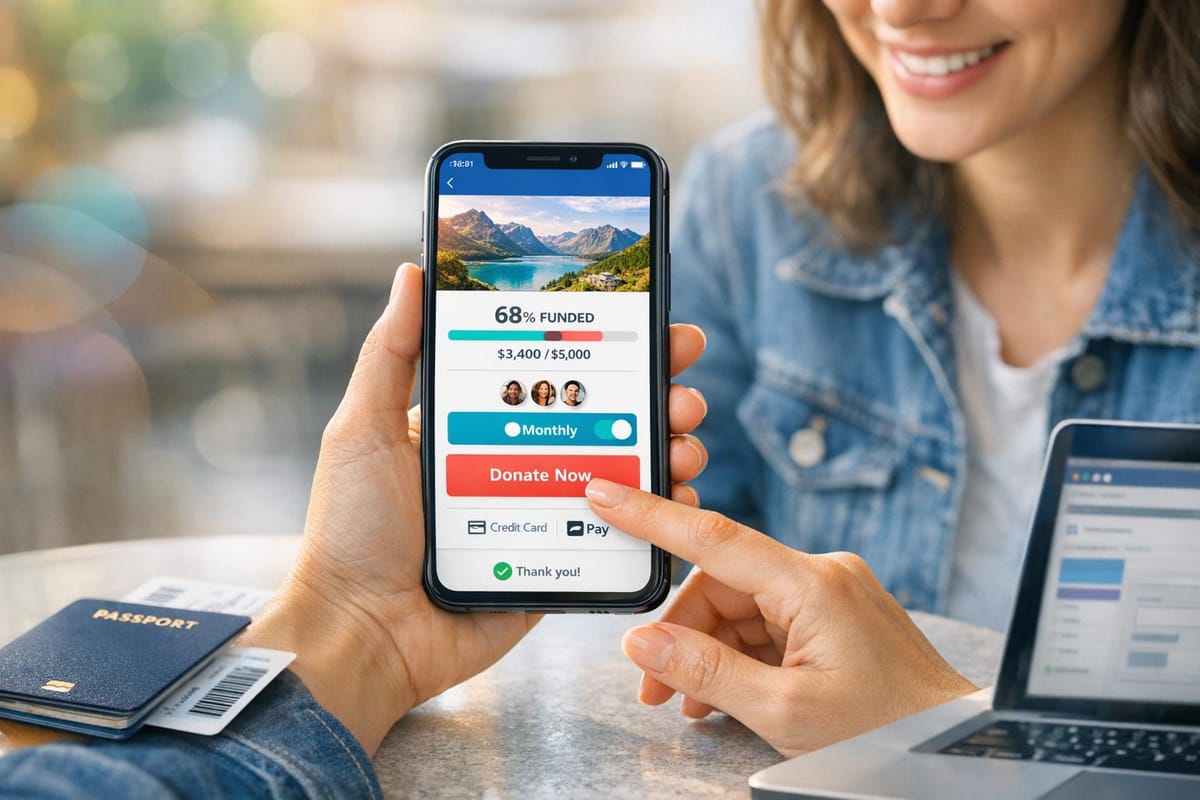
Custom trip pages on HelpYouSponsor (HYS) serve as centralized fundraising hubs for mission trips and service projects. These pages allow nonprofits to share project stories, set donation goals, and track progress in real time, enhancing donor engagement. Key features include automated receipts, thank-you emails, and branding customization. HYS supports one-time and recurring donations, with options for donors to allocate funds to specific categories like lodging or transportation.
Key Steps to Get Started:
- Set Up Your Account: Configure organization details, choose a pricing plan (Free, Pro, or Max), and select the "Campaign" program type for trip fundraising.
- Link Payment Gateways: Connect platforms like Stripe or PayPal for seamless transactions.
- Prepare Project Information: Craft donation program descriptions, create custom forms for donor and participant details, and set up automated email communication.
- Build and Customize Your Page: Use templates to design a visually appealing, mobile-friendly page that aligns with your brand.
Boost Engagement:
- Use storytelling tools to connect donors with beneficiaries.
- Share updates via automated emails and newsletters.
- Add progress trackers to show donation impact.
- Offer recurring donation options to sustain funding.
With HYS, nonprofits can use fundraising strategies to manage campaigns efficiently, keep donors informed, and create meaningful connections between supporters and their causes.
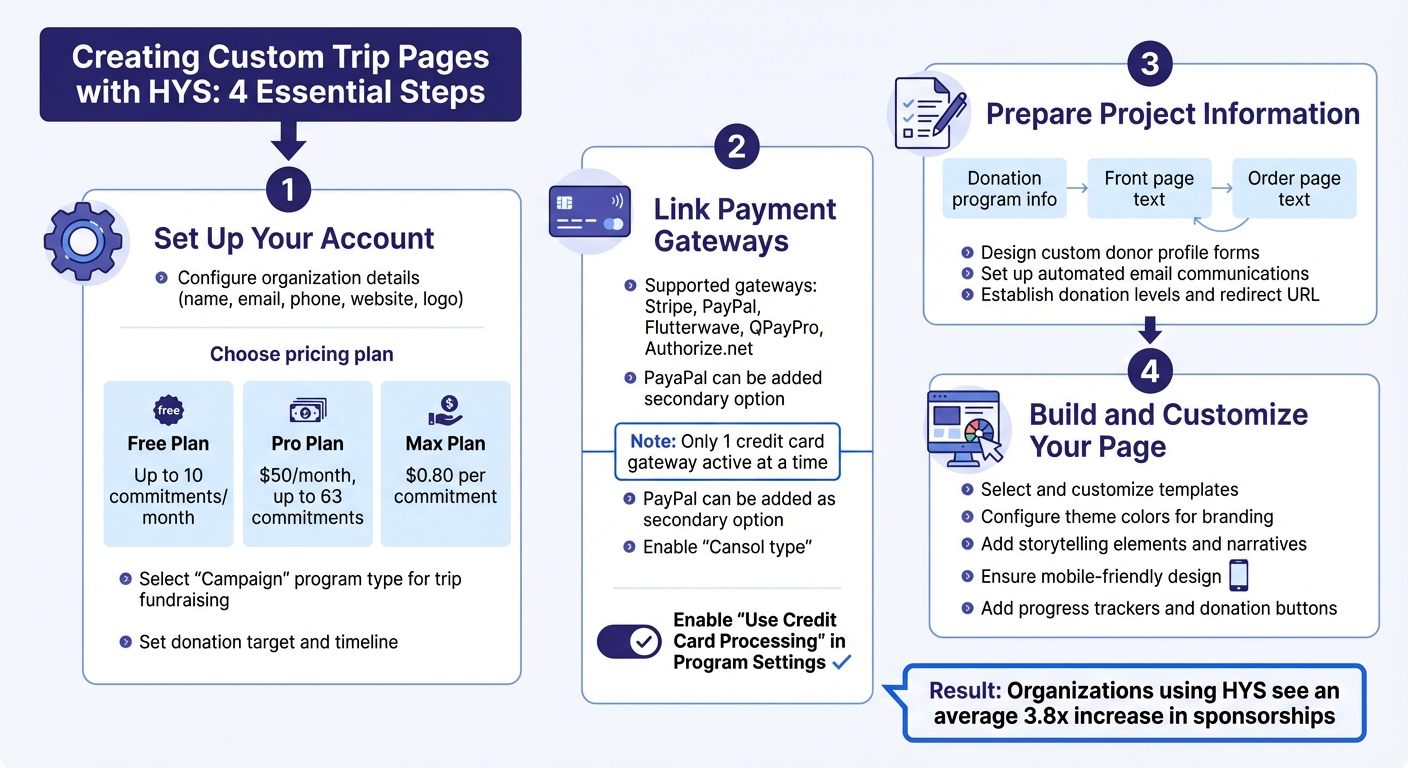
4-Step Guide to Creating Custom Trip Pages on HelpYouSponsor
How to Create a Donation Page that Converts (Webinar Replay!)
What You Need Before Creating Custom Trip Pages
If you're planning to build a custom trip page on HelpYouSponsor, there are a few key steps to tackle first. These steps ensure your page runs smoothly and processes donations without any hiccups. Here’s what you need to know to get started.
Setting Up Your HYS Account
First, configure your account details. Head over to the Account Settings section under the Settings menu and fill in your organization's name, email, phone number, website, and logo URL for the donor login page. Next, select your preferred base currency for transactions and choose a date format that works for you.
HelpYouSponsor offers three pricing plans to fit different needs:
- Free Plan: Allows up to 10 commitments per month.
- Pro Plan: Costs $50/month and supports up to 63 commitments.
- Max Plan: Charges $0.80 per commitment.
Pick the plan that aligns with your fundraising goals. For trip pages, use the Campaign program type. This setup focuses on a single cause with a total donation goal, rather than managing individual recipient profiles. Be sure to name your program and create an abbreviation that clearly identifies your trip. You’ll also need to define your donation target and set a timeline for the campaign.
Once your account is ready, the next step is setting up your payment gateways.
Connecting Payment Gateways
HelpYouSponsor integrates with five payment gateways: Stripe, PayPal, Flutterwave, QPayPro, and Authorize.net. However, you can only activate one credit card gateway at a time (Stripe, Flutterwave, QPayPro, or Authorize.net), though PayPal can be added as a secondary option. To manage these, go to the Payment Gateways settings.
For Stripe, you’ll need your publishable and secret keys, which can be found in the Stripe Developers dashboard (ensure test mode is off). Then, navigate to the Payouts tab and select "Setup Stripe Connect" to finalize the integration. If you’re adding PayPal, create an app on the PayPal Developer platform to get your Client ID and Secret. You’ll also need to set up a webhook using the URL:
https://api.helpyousponsor.com/v1/paypal/webhookapi.helpyousponsor.com
and enable the "Payment Sale Completed" event to generate a Webhook ID. Finally, activate the gateway for your trip program by editing the Program Settings and checking the "Use Credit Card Processing" box.
Once your payment gateways are linked, it’s time to gather the details for your trip project.
Collecting Project Information
Start by preparing the key content for your trip page. You’ll need three main text blocks:
- Donation program info: Appears below your main image.
- Front page text: Featured prominently at the top of your listing page.
- Order page text: Displayed at the top of your donation form.
Next, decide what donor information to collect during checkout. Create custom fields for your Donor Profile form - these might include basics like name, email, and phone number, as well as trip-specific details like T-shirt sizes or emergency contacts. Pre-map these fields in the Manage Fields section.
Don’t forget to configure your automated communications. Set a "From" email address and draft messages for your Auto Email Sets, which handle receipts and thank-you notes. Finally, establish donation levels (specific transaction amounts) and prepare a redirect URL to guide donors after they complete their transactions.
With these steps completed, you’ll have everything in place to create a seamless and effective trip page.
How to Build a Custom Trip Page
Once your setup is complete, you can create your custom trip page directly from the HYS dashboard.
Logging Into the HYS Dashboard
After setting up your account and payment details, log into the HYS dashboard. From the main menu, select "Programs", then click on "Recipients", and finally choose "Create a program". This will open a form where you can enter your "Program Name" and "Program Abbreviation". These fields help keep your campaigns organized and make your trip easily identifiable for donors.
Selecting and Customizing a Template
In the "Program Settings" drawer, select a program type that fits your trip’s fundraising model. For general contributions, choose Campaign. If your trip involves donors sponsoring individuals, opt for the Number of Sponsors or Contribution types.
To adjust the visual branding of your page, click the "Embed" button for any program and access the Theme Color Configuration. Here, you can either stick with the default Indigo 600 palette or select a custom color scheme that aligns with your organization’s branding. A real-time preview updates as you make changes, so you’ll see exactly how the page will look to donors. If you need help with any setting, click the green information icons for guidance. Once your design is finalized, you can move on to adding content and features to your campaign.
Adding Page Elements
Now it’s time to embed the details of your trip. In the "Program Settings" section, use the "Sponsorship program info" field to provide a narrative about your trip. This will give donors an immediate understanding of your cause. You can also include "Front page text" to introduce the campaign at the top of your listing page. Set a "Donation target" to show the total amount you aim to raise, and define specific "Sponsorship amounts" if applicable.
To collect important information, navigate to the "Forms" tab. Here, you can create custom forms to gather details from both participants and donors. Use "Recipient Profile" forms to highlight participants, and "Donor Profile" forms to capture supporter information. Additionally, configure a "Redirect URL" to direct donors to a thank-you page after their transaction is complete. Don’t forget to set up an "Auto Email Set" so donors receive immediate receipts and acknowledgment emails from your organization.
How to Increase Engagement on Custom Trip Pages
Once your custom trip page is live, the next step is to keep donors and participants engaged. HYS offers features specifically designed to encourage interaction and connection. By leveraging these tools, you can turn a simple page into a dynamic and engaging donor experience.
Using Storytelling Features
HYS provides tools like "Sponsorship Program Info" and "Profile Page Text" to help you share compelling narratives right below recipient photos. This ensures the story remains front and center, drawing attention to the challenges, beneficiaries, and transformations your trip supports.
Another way to create a personal connection is by using Merge Tags (e.g., en_child_name) in automated emails. These tags let you include specific recipient details in your messages, such as names or project updates. This personalized approach helps donors feel a direct connection to the individuals or causes they’re supporting, fostering a sense of meaningful involvement.
Setting Up Automated Updates
Storytelling doesn’t stop at the initial connection - it’s important to maintain regular communication. Use content calendars and scheduling tools to plan updates in advance, ensuring a steady stream of information without the need for daily manual effort.
To make these updates impactful:
- Prepare a shot list in advance, focusing on key moments and visuals that highlight the trip’s impact.
- Select your best media within 48 hours of capturing it to keep details fresh.
- Share updates that emphasize the experience and impact of the trip rather than just logistical details.
Including personal anecdotes and challenges from the field can make your updates more relatable and engaging. Keep updates concise by limiting them to 2-3 high-quality images, which helps maintain a professional and polished look without overwhelming the audience.
Improving User Experience
A user-friendly, mobile-optimized design is essential for boosting engagement. Make sure your page design aligns with your branding and prominently features clear, high-contrast donation buttons. Studies show that high-contrast call-to-action buttons can increase effectiveness by as much as 202%. Organizations utilizing HYS have reported a 3.8x increase in sponsorships after refining these design elements.
With 62.73% of website traffic coming from mobile devices, it’s crucial to ensure your page functions seamlessly on phones and tablets. Break up long paragraphs into shorter, scannable sections, and use bullet points where it makes sense. Place the most important information - like your trip’s purpose and donation goal - at the top of the page so it’s immediately visible.
As Kristopher Tabaie, a web developer from Lesar UK, explains:
Good web design is about more than just aesthetics. It involves a user-friendly layout, clear navigation, and a clean interface that clearly communicates the content.
Adding Transparency and Donation Tools
When it comes to donor engagement, transparency is key. It builds trust, which is essential for encouraging contributions. Tools that clearly show how donations are used and provide updates on progress can make a big difference. According to OneCause's Giving Experience study, "Trust is the top motivator for giving". When donors see exactly how their money is being used and track goals in real time, they’re more likely to contribute - and to keep coming back.
Adding Progress Trackers and Reports
HYS makes it easy for donors to see the impact of their contributions with real-time progress updates. To set this up, go to Program Settings and select the Campaign program type for your trip. Enter your financial goal in the Donation target field. This creates a tracker that updates automatically as donations roll in.
If your trip involves individual participants needing specific funding, switch to the Contribution program type. Then, set the Amount(s) to complete sponsorship field. This ensures the tracker shows progress for each participant, making it clear who still needs support.
Want to see how it looks? Use the Embed feature to preview the tracker. You can also adjust the colors with the Theme Color Configuration to match your organization’s branding. To keep donors informed, set up Auto Emails with short codes that notify them of progress and direct them back to the trip page.
Enabling Recurring Donation Options
Recurring donations provide ongoing support, which can be a game changer for your trips. Organizations that offer recurring options and maintain regular updates tend to retain more donors.
To enable this, head to Program Settings and configure the Transaction amount(s) field for your campaign. This lets donors choose between one-time or monthly contributions toward your goal. You’ll also want to create a custom Donor Profile form by clicking Create Form in the Forms tab. This captures important details like donation frequency.
Make sure the recurring donation option is easy to spot - place it prominently in your page’s hero section to encourage more conversions. Test the form on mobile devices to ensure the toggle works smoothly. Finally, enable Automated Updates to send receipts and regular updates to recurring donors, which helps build loyalty.
Connecting Email Campaigns
Email campaigns are a powerful way to keep donors informed and engaged. They drive traffic back to your custom trip page and encourage ongoing support. HYS offers two tools for this: Newsletters for broad updates and Auto Emails for messages triggered by donor actions.
Use the Newsletter Tool to share updates, photos, and progress reports. The process is simple - compose your message, select recipients, and preview before sending. With the Tags feature, you can segment your audience and send targeted updates to donors interested in specific trips or projects.
For automated communication, configure Auto Emails to handle tasks like sending receipts or reminders automatically. Use Merge Tags like en_child_name to personalize messages with donor-specific details. Always test your emails with the Test Email button to ensure links to your trip page work correctly.
Don’t forget to set your From Email Address and From Name in Account Settings so your communications are professional and recognizable. You can also use the Redirect URL feature in Campaign settings to send donors to a thank-you or update page immediately after they complete a donation.
Best Practices for Donor and Participant Engagement
These strategies build on earlier efforts to create a smooth, engaging, and transparent trip page that connects donors with your mission. By focusing on personalization, impact tracking, and mobile-friendly design, you can turn one-time donors into lifelong supporters.
Personalizing Donor Experiences
Making interactions personal is a game-changer when it comes to donor engagement. Using a donor's name or referencing their past contributions shows them they’re valued. And the stats speak volumes: 44% of donors say they'd give more if communications were tailored to them, and personalized email subject lines see a 26% higher open rate.
HYS simplifies this with merge tags that automatically add donor-specific details to your trip pages and emails, creating a stronger bond between supporters and the causes they care about. You can also use behavioral triggers in automated emails to send timely messages, like a thank-you note when someone completes a sponsorship or revisits your page.
"You're building a donor base, not a database." - Matt Bitzegaio
Keeping donor data up-to-date is crucial. Generic greetings can feel impersonal and damage trust. For new participants, consider setting up a 30-day welcome series to share your mission and impact stories before asking for additional donations. Poor communication is a major issue - 53% of donors stop supporting organizations because of it - so make every interaction count.
Showing Impact Metrics
Once you’ve personalized your communications, it’s equally important to show donors the tangible results of their contributions. Donors want to see the difference their money is making. Clear, measurable outcomes help build trust and encourage future giving. HYS's Donation Statistical Cards let you showcase contributions over the past month, and you can set a Donation Target to give donors a clear goal to rally around.
Beyond numbers, highlight qualitative milestones like educational successes, health improvements, or personal stories from the field. The Activity Log provides a timeline of ongoing progress, while features like Soft Credits and Influenced Totals can show donors the ripple effect of their generosity, including how they’ve inspired others to give.
Visual updates can make a lasting impression. Use charts, photos, or videos to complement financial metrics and create emotional connections that numbers alone can’t achieve. The Reporting and Analytics tools can help you gather insights to share with donors, reinforcing how their support is driving meaningful change.
Optimizing for Mobile Devices
In today’s world, a smooth mobile experience is non-negotiable. With most people using smartphones and many donors preferring to give online, your trip page needs to function seamlessly on smaller screens. A poor mobile experience can be a dealbreaker - 53% of donors cite bad communication and clunky user interfaces as reasons they stop supporting organizations.
HYS offers tools to help you create a polished mobile experience. Use the Theme Color Configuration to ensure your page looks professional on any device, and test the Real-Time Preview to see how mobile users will interact with your page. Simplify Program Forms by asking only for essential details.
Enable the Bio Field in recipient profiles so donors can instantly connect with the person or project they’re supporting. Reduce notification overload with the Combine Same-Day Charges feature, and make recurring donations easy to select with a clear "Make this monthly" checkbox.
Donors who engage through multiple channels have a lifetime value that's 300% higher than those who stick to just one. By ensuring your mobile experience is user-friendly, you’re not just improving convenience - you’re encouraging deeper, long-term connections.
Conclusion
Custom trip pages with HelpYouSponsor (HYS) combine automated engagement, transparent progress tracking, and responsive design to build trust and encourage action. Features like Theme Color Configuration, Bio Fields, and Merge Tags work together to create professional and personalized experiences that transform how nonprofits connect with their supporters. Organizations using HYS have seen an average 3.8x increase in sponsorships, showing how the right tools can dramatically extend a mission's reach.
With automation, clear tracking, and mobile-friendly design, supporters stay engaged and feel appreciated throughout their journey.
HYS also offers flexible program options tailored to different fundraising models. Whether it’s a Contribution program with set financial goals, a Number of Sponsors initiative for one-on-one connections, or a Campaign for general fundraising efforts, the platform adjusts to fit your needs. Impressively, it automates up to 90% of sponsorship management tasks, giving your team more time to focus on nurturing relationships and growing your impact.
From the Free Plan to the Pro Plan at $50/month, HYS grows alongside your fundraising goals. It’s a platform designed to turn supporters into lifelong advocates.
FAQs
Which HYS program type should I use for my trip?
The type of HYS program you choose should match the structure and goals of your trip:
- Contribution: Ideal for donation-based sponsorships with specific amounts, such as $200 per recipient.
- Number of Sponsors: Works well when you have fixed sponsor slots, like one sponsor per recipient.
- Campaign: Perfect for flexible fundraising efforts, allowing for one-time or recurring donations.
Select the option that fits your trip's requirements best.
How do I accept both credit cards and PayPal on my trip page?
To allow donors to pay using both credit cards and PayPal, you'll need to configure a supported credit card gateway (like Stripe, Flutterwave, QPayPro, or Authorize.net) and set up PayPal separately. Head to the Payment Gateways section under Settings, where you can enable PayPal by entering your PayPal Client ID, Secret, and Webhook ID. Once everything is set up, your trip page will give donors the option to pay via credit card or PayPal.
What’s the best way to show donors where their money goes?
The most effective way to keep donors informed about how their contributions are used is through clear, transparent updates. Share the impact of their generosity using stories, photos, videos, and milestones that highlight the progress of projects or the lives of beneficiaries.
Consider creating personalized trip pages that combine storytelling with visual elements. These pages can illustrate outcomes and provide financial updates, helping to build trust and show donors the tangible difference their support makes.