
The Role of Automation in Nonprofit Success: Streamlining Donor Management
Automation saves staff hours, boosts donor retention, and increases fundraising by 20–25% through CRM, automated messaging, and payment tracking.

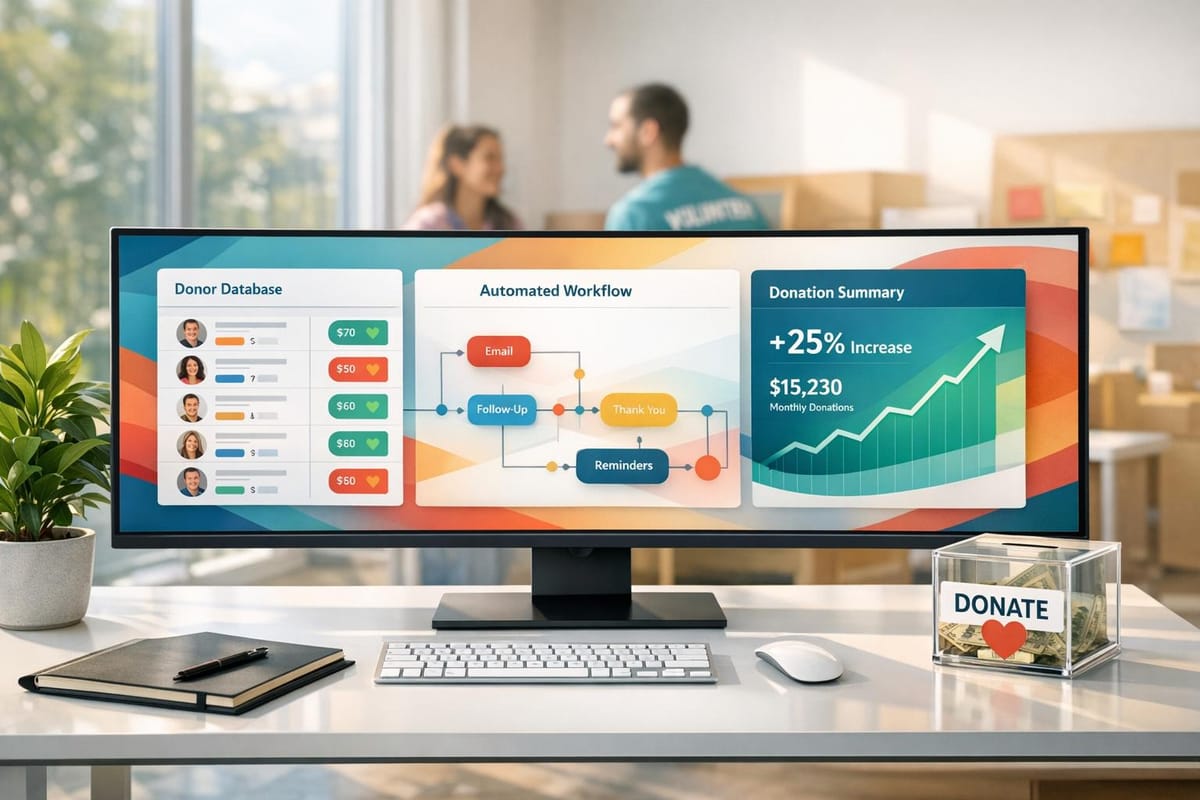
Nonprofits face a tough reality: 80% of first-time donors in the U.S. never donate again, and charitable giving dropped by 10.5% in 2022. Managing donor relationships effectively is critical, yet many nonprofits rely on outdated manual processes like spreadsheets, which lead to errors and wasted time. Automation offers a solution by simplifying tasks, improving donor retention, and increasing fundraising results.
Key Takeaways:
- Time Savings: Automating tasks like data entry and payment processing can save up to 30 hours per month.
- Improved Donor Retention: Donors are 4x more likely to give again if thanked within 48 hours - automation ensures timely, personalized communication.
- Higher Revenue: Nonprofits using automation report a 20-25% increase in funds raised within their first year.
- Practical Tools: Platforms like HelpYouSponsor centralize donor data, automate messaging, and streamline payment tracking.
Automation isn’t just about saving time - it enables nonprofits to focus on building meaningful donor relationships and advancing their mission. Start small by automating one repetitive task, like sending donation receipts, and scale from there.
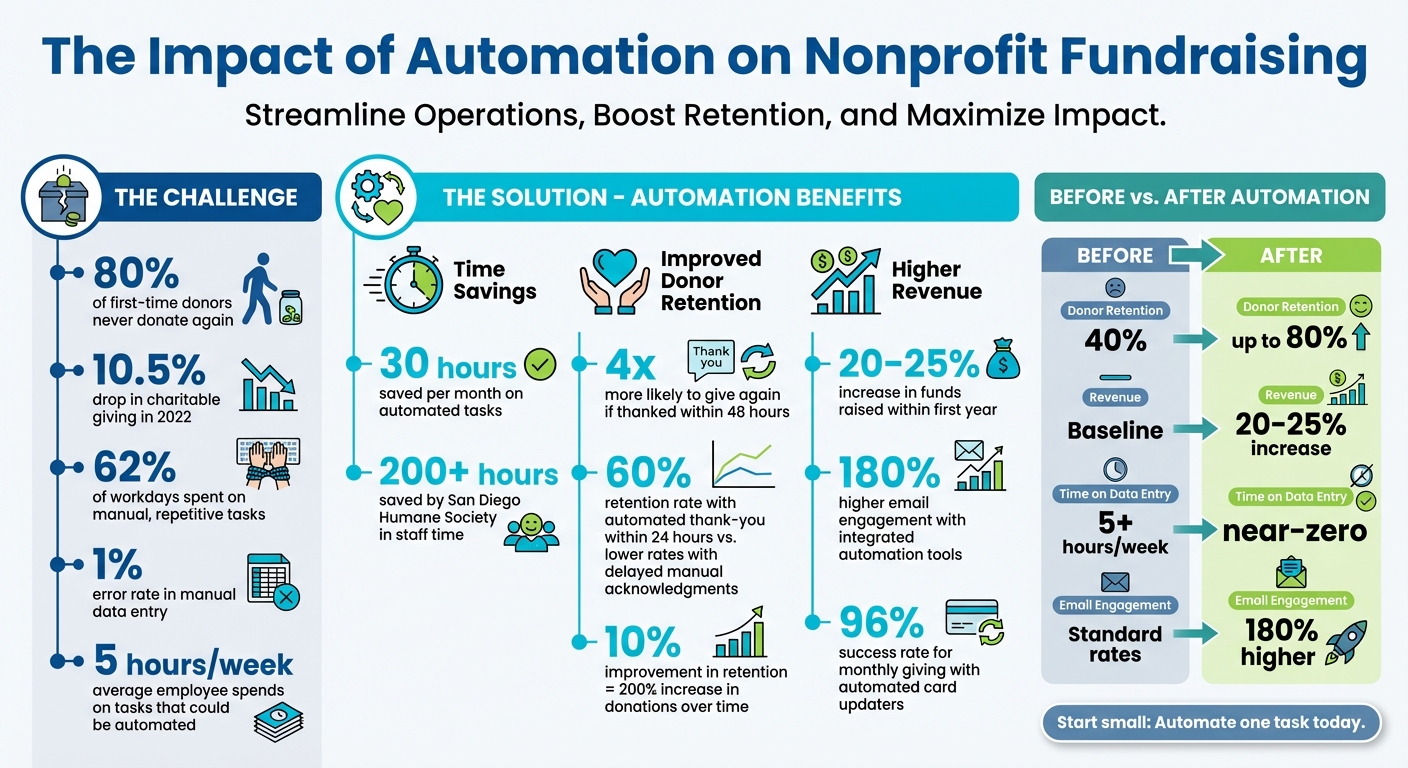
Impact of Automation on Nonprofit Fundraising: Key Statistics and Benefits
How Nonprofits Can Scale Donations with CRM: Ditch Spreadsheets for Smarter Donor Management
Benefits of Automating Donor Management
Automation is reshaping how nonprofits operate by taking over repetitive, time-consuming tasks. Think about this: 62% of most workdays are spent on manual, repetitive work like data entry, follow-ups, and report generation. For a typical U.S. employee, that adds up to nearly five hours a week. By automating these processes, your team can reclaim that time and focus on what matters most - building stronger relationships with donors and expanding your organization’s reach.
The financial upside is just as compelling. Nonprofits that adopt integrated donor management software often see a 25% increase in funds raised within the first year. Plus, organizations using intuitive fundraising tools typically experience a 20% boost in revenue during the same time frame.
Time Savings and Efficiency
Automation simplifies donation tracking by instantly recording and categorizing gifts in your CRM. It syncs donor details, gift amounts, and giving history in real time, eliminating the need for manual data entry, which typically has a 1% error rate.
Take the San Diego Humane Society as an example. By automating its sustained giving program, the organization saved over 200 hours of staff time by July 2025. Instead of manually processing recurring donations each month, their team redirected those five full workweeks toward donor engagement and program development.
Automated reporting is another game-changer. Fundraising reports and dashboards can be scheduled to land directly in stakeholders' inboxes, cutting out the manual work of compiling data from multiple systems. Financial reconciliation also becomes faster - integrating your CRM with accounting software automates journal entries and matches bank feeds to your ledger, speeding up month-end closings.
These efficiencies not only free up valuable time but also allow your team to focus on engaging donors and driving your mission forward.
Better Donor Retention and Engagement
Timing is everything when it comes to retaining donors. Donors are 4x more likely to give again if they receive a thank-you within 48 hours. Automation ensures this happens seamlessly by sending personalized thank-you emails and receipts immediately after a donation. These messages can include specific details like the donor’s name and gift amount, creating a more personal touch.
Engaging first-time donors early is critical - they’re much more likely to give again if you connect with them within the first 60 days of their initial gift. An automated welcome series, typically a sequence of three emails focusing on gratitude, your mission, and next steps, can build momentum without requiring manual follow-up. Automation can also flag donors who haven’t given in 3, 6, or 12 months, triggering tailored "win-back" campaigns to re-engage them.
Personalization is key to building stronger donor relationships. Instead of sending generic mass emails, automated systems use donor data - like interests, giving history, and past behavior - to deliver highly targeted and relevant communications. Advanced tools can even alert staff when a donor takes a high-interest action, such as visiting a planned giving page, enabling timely, personalized follow-up. As DonorPerfect puts it:
"Automation handles routine tasks so you can hold personal conversations, show gratitude, and build trust".
Organizations that integrate email marketing tools with their donor management systems see 180% higher email engagement compared to those using standalone solutions.
By automating communication and personalizing outreach, nonprofits can deepen connections with donors and improve retention rates.
Increased Fundraising Results
Automation doesn’t just help maintain donor relationships - it helps grow them. AI-powered tools can identify high-potential prospects and dynamically update donor lists, ensuring timely follow-ups that lead to meaningful contributions.
This growth comes from improved data accuracy, timely communication, targeted campaigns based on donor behavior, and staff having more time to focus on high-value activities. For instance, Holmes Murphy, an insurance brokerage firm, used CRM automation and AI to analyze client behavior, saving 44,000 hours and $6.9 million. While this example is from the corporate world, the principle applies directly to nonprofits: automating routine tasks frees up time for strategic efforts that drive revenue growth.
Natalie Anderson, Senior Nonprofit Industry Marketing Manager at Sage Intacct, sums it up perfectly:
"Nonprofits benefit from donor management automation by saving time, reducing administrative burdens, and building and maintaining strong donor relationships".
The combined effects of time savings, improved donor retention, and increased fundraising create a powerful ripple effect. Staff spend less time on administrative tasks, donors receive timely and personalized communication, and your organization gains the financial stability to serve more people and achieve its mission.
Tools for Automating Donor Management
Today's automation tools bring donor data together in one place, offering a complete picture of giving history, communication preferences, and wealth indicators. These tools directly address the inefficiencies that can make donor engagement a challenge.
CRM Platforms for Donor Tracking
A well-designed CRM system organizes donor data, tracks interactions, and creates reports on donation trends. This streamlined approach allows your team to spend less time searching for information and more time building meaningful connections with donors.
For example, HelpYouSponsor provides a comprehensive donor management system tailored for nonprofits running sponsorship programs and fundraising initiatives. It handles sponsorships for projects like child support, medical surgeries, and building campaigns, all while keeping donor records in one central hub. With AI-driven insights, the platform identifies donors who are ready to give and suggests the best times to reach out, removing much of the guesswork. This means less manual work for your team and more opportunities to deepen donor relationships.
Next, let’s explore how automated messaging can enhance personalized outreach to donors.
Automated Email Campaigns and Messaging
Personalized communication is key to retaining donors, but manually managing outreach for hundreds - or even thousands - of supporters isn’t realistic. Automated messaging tools solve this by using data fields and segmentation to send tailored thank-you notes and updates about the impact of donations. These tools help strengthen relationships by delivering timely, relevant messages based on donor behavior and giving patterns.
HelpYouSponsor’s messaging system takes this a step further by automating personalized outreach while keeping the tone warm and personal. You can segment your donor list and schedule campaigns that align with each donor’s interests and history, reducing administrative work while maintaining meaningful connections.
Donation Tracking and Payment Gateways
Efficient payment processing systems ensure every transaction is recorded, donor records are updated, and receipts are issued automatically - all without the need for manual input. This not only keeps records accurate but also enhances donor satisfaction by providing immediate confirmation of their gifts.
HelpYouSponsor integrates seamlessly with various payment processors, automatically logging transactions and generating reports as needed. This eliminates repetitive data entry tasks, allowing your team to focus on what really matters - engaging with donors and advancing your mission.
How to Implement Automation in Your Nonprofit
Shifting from manual processes to automation requires a thoughtful and structured approach. It's not just about adopting new tools - it's about aligning these tools with your nonprofit's specific needs and ensuring your team is ready for the change. Here's how to choose the right tools and implement them effectively.
Choosing the Right Automation Tools
Start by conducting a needs audit to distinguish between must-have features and optional extras. For instance, prioritize essentials like a centralized donor database and gift tracking. Add-ons, such as event management tools, can come later.
One critical factor to consider is integration capabilities. Your automation tools should seamlessly connect with existing systems, like your fund accounting platform, to provide a unified view of donor data. Poor integration can lead to data silos, which undermines the very purpose of automation.
Another key consideration is the total cost of ownership. This includes more than just licensing fees; factor in migration costs, ongoing support, integrations, and staff training. Opt for software that can grow alongside your organization. For example, HelpYouSponsor offers a flexible pricing model on its Max Plan, charging $0.80 per commitment, ensuring you only pay when the platform actively benefits your nonprofit.
"Automation is using technology to improve processes - and visibility between processes - with minimal human input, which enables your nonprofit to scale more effectively." – Blackbaud
Ease of use is also crucial. Tools with intuitive interfaces and robust training materials are more likely to be embraced by your team. Even the most advanced system won't deliver results if your staff struggles to use it.
Data Migration and Staff Training
Before migrating any data, create a complete backup of your current database. This step is essential to safeguard your information. Next, conduct a data audit to identify which fields are critical and which ones are outdated or redundant.
Clean your data before migration - not during or after. This means eliminating duplicate entries, validating contact details, and standardizing formats for phone numbers and addresses. Keep in mind that manual data entry typically has an error rate of about 1%. Migrating inaccurate data will only amplify these issues.
"Dirty data is data containing errors, whether it's outdated, incomplete, duplicated, or simply incorrect." – AccuData
Involve your team early in the process, not just during the final stages of training. When staff understand the reasons behind the change, they're more likely to support it. Identify enthusiastic team members to act as champions who can lead by example and address concerns among peers.
Create permanent documentation, including training guides and best practices, to ensure continuity when new employees join. Training should include a mix of workshops, hands-on sessions, and role-specific tutorials. Schedule these sessions during slower periods - steer clear of peak times like year-end fundraising when your team is already stretched thin.
Address resistance by showing how automation reduces repetitive tasks. On average, 62% of a typical workday is spent on manual, repetitive activities. Eliminating these tasks can free up nearly five hours per week for more meaningful work.
Once your data is clean and your team is prepared, you're ready to test and refine your automated workflows.
Testing and Improving Automated Workflows
Begin by testing on a small scale. Roll out automated workflows with a limited group to identify issues before launching organization-wide. Start with simple tasks, like sending automated thank-you emails after donations or setting up alerts for expiring credit cards of recurring donors.
Leverage A/B testing to fine-tune donor engagement strategies based on real data. For example, test different email subject lines or sending times to see what resonates most with your audience. Use your automation platform's dashboard to monitor results and make adjustments as needed.
Set up feedback loops by regularly gathering input from staff throughout and after implementation. Their firsthand experience can highlight friction points you might miss. Establish clear guidelines for data entry to maintain consistency and avoid errors from day one.
Finally, budget not just for software but also for the time and resources needed to redesign workflows and support ongoing staff adoption. Remember, automation is not a one-and-done project. It's a continuous process of improvement that evolves alongside your nonprofit's needs.
Measuring the Impact of Automation on Fundraising
Once you've implemented automation, the next step is tracking its performance. This helps refine strategies and make the most of its potential.
Metrics to Track
Focus on key performance indicators like donor retention, fundraising efficiency (comparing contributions to expenses), and staff productivity (time saved on repetitive tasks). For example, in the U.S., the average attrition rate for first-time donors is a staggering 80%. However, automation can make a significant difference - just a 10% improvement in donor retention can lead to a 200% increase in donations over time.
Consider this: the average U.S. employee spends nearly five hours a week on tasks that could be automated. By cutting down on these repetitive activities, your team can shift their focus to building stronger donor relationships, which ultimately boosts revenue.
Another crucial area to monitor is communication engagement. Metrics like email open and click-through rates reveal how well your automated, personalized messages are connecting with supporters. Nonprofits using integrated email marketing automation report 180% higher engagement compared to those relying on standalone tools.
"Automation afforded by integrated accounting and fundraising functionality streamlines donor management and nonprofit finance. Shared data empowers greater collaboration between the finance and development teams, ensuring financial accountability and transparency." – Natalie Anderson, Senior Nonprofit Industry Marketing Manager, Sage Intacct
Using Dashboards for Data Insights
Modern CRM dashboards bring fundraising and financial data together, offering real-time insights at a glance.
For instance, during high-stakes campaigns like Giving Tuesday or year-end drives, visual goal meters can help track progress in real time. You can also set up scheduled reports to automatically deliver key metrics, such as retention rates and donation trends, on a regular basis. This eliminates the need for manual tracking and ensures consistent performance monitoring.
Tools like HelpYouSponsor's dashboard features enable nonprofits to visualize performance and make informed decisions with ease. Advanced systems can even flag donors who are at risk of lapsing or those ready to increase their contributions. Acting on these insights proactively can make a big difference. Comparing these findings to your pre-automation data will also help you measure how far you've come.
Before and After Automation Comparison
To fully understand the impact of automation, compare your baseline metrics (manual processes) with the improvements achieved post-automation.
| Metric | Manual Process Baseline | Automated Improvement | Source Data |
|---|---|---|---|
| Donor Retention Rate | 40% | Up to 80% | Retention Analytics |
| Annual Revenue | Baseline | 20-25% increase | CRM Financial Reports |
| Time Spent on Data Entry | 5+ hours/week | Near-zero for automated workflows | Workflow Analysis |
| Email Engagement | Standard rates | 180% higher engagement | Integration Reports |
| Monthly Giving Success | Variable with manual follow-up | 96% with automated card updaters | Transaction Reports |
Nonprofits often see a 20% to 25% increase in revenue within the first year of using automated fundraising tools. Moreover, donors who receive an automated thank-you within 24 hours of their gift are retained at a rate of 60%, compared to much lower rates with delayed manual acknowledgments.
Conclusion
Automation has become a game-changer for nonprofits striving to thrive and grow. With 62% of the average workday consumed by repetitive tasks, organizations are losing valuable hours that could be better spent building strong donor connections and advancing their mission. In fact, nonprofits that adopt integrated automation tools report raising up to 25% more funds within their first year. These numbers make one thing clear: automation isn’t just helpful - it’s necessary.
Start small. Pick one repetitive task - whether it’s sending donation receipts, thank-you emails, or managing recurring gifts - and automate it first. The time savings will be evident immediately, giving your team more bandwidth to focus on what truly matters: fostering relationships and sharing your mission. As Liz Morris aptly says:
"Automation manages the behind-the-scenes processes, allowing your team to strengthen relationships, communicate your story, and advance your mission".
To tackle these challenges, platforms like HelpYouSponsor offer tailored solutions for nonprofits. This platform integrates donor management, automated messaging, and real-time reporting into one seamless system, cutting down on manual errors and eliminating data silos. Plus, its pricing grows with your organization, starting with a free plan for up to 10 commitments per month - ensuring you only pay when the software delivers results.
Beyond saving time, automation helps reduce donor attrition, increases revenue, and saves nearly five hours per week. That’s extra time your team can use to engage donors and strengthen relationships. In a landscape where charitable giving dropped by 10.5% in 2022, efficient donor management isn’t just a luxury - it’s the key to ensuring your organization not only survives but thrives.
FAQs
How can automation help nonprofits retain donors more effectively?
Automation plays a key role in helping nonprofits maintain strong donor relationships by streamlining communication and managing interactions more effectively. For example, automated systems can instantly send personalized "thank you" messages after a donation, expressing gratitude and reinforcing the donor's decision to support the cause. Scheduled updates and outreach campaigns keep donors informed about the organization's progress, creating a stronger sense of involvement and loyalty.
By automating tasks like data entry, donor segmentation, and tailored messaging, nonprofits can minimize errors and ensure timely, consistent communication. This not only saves valuable time and resources but also allows teams to focus on fostering meaningful, personal connections with donors. The result? Higher retention rates and a better overall experience for supporters.
How can automation tools improve donor management for nonprofits?
Automation tools have the power to reshape how nonprofits handle donor management by streamlining repetitive tasks and boosting efficiency. With processes like data entry, donation tracking, and sending personalized thank-you messages handled automatically, nonprofits can save time and minimize mistakes. This shift allows teams to dedicate more energy to fostering meaningful connections with donors instead of getting tied up in administrative duties.
On top of that, automation strengthens donor engagement through customized communication. Features like automated email campaigns and timely follow-ups create a more personal touch, which can encourage donor loyalty and lead to repeat contributions. Many tools also include analytics that offer insights into donor behavior, helping nonprofits fine-tune their strategies and make informed decisions. By integrating automation, organizations can run smoother operations, build stronger relationships with their supporters, and achieve better results in their fundraising efforts.
What steps should a nonprofit take to start using automation effectively?
To get started with automation, nonprofits should begin by pinpointing tasks that are repetitive and eat up valuable time. Think about things like entering donor information, sending thank-you emails, or keeping track of donations. These are prime areas where automation can step in to save time and boost productivity.
Once you've identified these tasks, look for tools that work smoothly with the systems you already use, such as CRM software, email marketing platforms, or donor management tools. Many of these platforms come with built-in automation features that are simple to set up and tweak to your needs.
Start small by automating straightforward tasks, like sending personalized thank-you emails to donors or organizing them into segments for tailored communication. Over time, you can tackle more advanced workflows, such as monitoring donor engagement or setting up automated follow-ups. Make it a habit to periodically review and fine-tune your automated processes to ensure they’re achieving your goals and strengthening relationships with your supporters.